Monetize tips search

Showing posts with label Adsense. Show all posts

Saturday, August 17, 2019

Important AdSense questions, problems and solutions for beginners

Important AdSense questions, problems and solutions for beginners

Important AdSense questions, problems and solutions for beginners

Q: Should Ads be displayed while I'm waiting for my PIN? If so, why are my ADS won't display?

A: The PIN isn't sent until you have a minimum amount of $10 in your Balance, so ADS would have already be displaying which means ADS need to be working correctly, unless you have problem with your site. Try ADS tips for newbie publishers.

Q: Can I delete a disabled/suspended AdSense account?

A: No, you can not delete a disabled/suspended google adsense account. You should wait until suspension is terminated first.

Q: Why Adsense ADS not showing on my website?

A: There are many reasons why you website doesn't display ADS . 1) You placed more adsense ADS than the page can stand or the page has less content and not suitable for that mush of ADS. 2) Your website is not verified yet to show ADS. 3) Your web-host plan doesn't allow Google Adsense ADS to be displayed. 4) You did not place the ADS correctly in HTML <body>ADS</body> tag. 5) Your Google ADS account is disabled. 6) Adsense is removing old ADS starting Sept/2019 . 7) You have not entered you PIN yet. 8) Jav Script is not enabled 9) Google ADS are inside nested frames.

Q: Why did my website disapprove by Google Adsense team?

A: Your website disapproved by Google Adsense team could be the result of many factors. When you receive the email from Google ADS team, they don't specify the problem, the email is briefly like so "Our experts checked your site. At this time, it cannot be approved to serve ads because it has problems. You need to eliminate them". The reason why your website got disapproved also could be due to duplicate content or random content. You need to follow Google instructions carefully to be approved. Also your content may be prohibited, prohibited content will cause your Google ADS account to be disabled if it is already working. 

Q: How many Google adsense ADS can I display on my website/blog/forum?

A: Short answer 'Unlimited'. Long answer 'Less is much'. Let your visitors attracted by your ADS and your content. the less ADS your display in your well written content website the more ADS requests you get ,the more traffic you get and more earnings in the end. Read this for detailed answer. Visitors don't care about your ADS, they care about your content only, if they are not comfortable displaying your website because of your ADS they won't come again.

Q: Can I place my Google Adsense ADS on someone else's website or a website that doesn't belong to me?

A: Yes, you may place your google adsense ADS code any where you like as long as they are 'someone else's websites' complied with Google adsense policy. You will though be responsible for your adsense account, anytime your publisher 'website owner' violated Google Adsense Policy, your account will be disabled.

Q: Why my blogger 'blogspot' Url can't be added as a site?

Url can't be added as a site

A: While attempting to add my blogger 'blogspot' blog to Google Adsense sites 'Add site' , I get an error message 'Url can't be added as a site', you can not use 'add site' with blogger, you may only use Blogger Earnings menu to set up Adsense in your blogger from here :
monetize your blogger 'blogspot'
Add Blogger 'blogspot' to adsense
 You can also check if your blogger 'blogspot' is running ads by checking 'ADS.txt'.
check if adsense is running on your blog
Test if your ads.txt is working on blogger 'blogspot' blog
If you still don't see adsense ADS in your blog, check your 'Layout' the size of Gadgets could be the problems. Try 'responsive' ADS within blogger 'blogspot gadget'. You can also try inserting ADS code manually within JavaScript/Html gadgets in Layout, or directly into your Post from post HTML next to Compose.


Things we will discuss later :
- Things you need to know before applying to Google AdSense
- Reasons why your Google AdSense earns low.
- How advertisers choose you to place ADS on your blog?
- How to get ready for AdSense? (AdSense, before your start, must read.)
- There are many advertisers with the same product, how does it work with me?
- Closer look at Google AdSense homepage, what are those tools mean (CPC, CTR ...)
- How to write a successful blog?
- How to attract advertisers who pay high?
- How to successfully place an AD on your blog?
- How to build your audience community?
- How to choose your Keywords for your blog?
- How to stop irrelevant ADS from showing in your pages?

Friday, June 21, 2013

AdSense Revenues Repotrs for June/2013


AdSense Revenues Repotrs for June/2013

AdSense Revenues Repotrs for June/2013
evry1.net - AdSense Revenues for June/2013 so far


Things we will discuss later :
- Things you need to know before applying to Google AdSense
- Reasons why your Google AdSense earns low.
- How advertisers choose you to place ADS on your blog?
- How to get ready for AdSense? (AdSense, before your start, must read.)
- There are many advertisers with the same product, how does it work with me?
- Closer look at Google AdSense homepage, what are those tools mean (CPC, CTR ...)
- How to write a successful blog?
- How to attract advertisers who pay high?
- How to successfully place an AD on your blog?
- How to build your audience community?
- How to choose your Keywords for your blog?
- How to stop irrelevant ADS from showing in your pages?

Sunday, April 14, 2013

Practical example on how keywords maximize your AdSense earnings using AdWords keyword tool


Practical example on how keywords maximize your AdSense earnings using AdWords keyword tool

Intro

This is a simple search for Keywords using the free Google AdWords Keyword Tool to demonstrate to you how to successfully maximize your earnings by choosing a high earning CPC keyword for your page, blog, website. It doesn't matter if you are newbie or professional, the search for a high CPC is like a treasure hunt.

AdWord keywords search

I will choose a topic I.e "Programming Website", a programming website will basically talk about Programming languages, Programming courses, Programming solutions, How To(s), Source Codes and some lessons about creating applications. We know that Google AdSense doesn't support AdSense ADS within a desktop applications, it's against AdSense T.O.S. and policies. So, a programming contents writer shall not include under any circumstances include Google AdSense codes within his source codes while building a desktop application, also it's known that Google AdSense doesn't support AdSense ADS within an Iframe, but you may only use AdSense ADS in your website that has a programming contents.

Steps to start searching a high CPC keywords for your website.

Step #1 : Open Google AdWords service
high CPC keywords for your website.

Normally, if you have an AdSense account, then you are eligible to create a free Google AdWords account even if you are not going to use it to advertise your products, you can use Google AdWords Service to find what advertisers (About programming stuff) are willing to pay  you (Programming contents writer 'Publisher') for placing ADS about their relevant products on your relevant website, I.e :
A software company will want people that read about new software to read about their software products, and that will be done using your software programming "relevant" website.

Step #2 : Choose 'Keyword Tool'
AdSense : Google AdWords high paying CPC
When you click on "Keyword Tool", the page will take you to the Tool's main search page, and it looks like this :
High CPC paying Keywords search quest

Now, our mission is to find the highest paying CPC keyword that is relevant to "Programming" our website contents, so we fill in the sections in the page like this :

Word or phrase : Is where you tell the search tool about the matching keywords you wish to find an equivalent to, in our example we are writing about "Programming", so we will fill in a "Programming" keywords (programming, software, source code, desktop application) because, these are the keywords of the contents that we are writing about in our "programming" website.

Website : In case you want to find the cost of the Keyword CPC in a certain website, or a CPC provided by a certain website,  just leave it blank to widen your search results.

Category : To define the search category in order to get the most relevant keywords that matches your search criteria, because relevant ADS is an important method to maximize you earnings by displaying them "relevant ADS for visitors to click". I choose "Programming & Developer Software".

Only show ideas closely : Mark this selection box to display keywords that are related to your search criteria (s), but if you leave it unchecked then you will find a wide range of keywords which some of them is not needed in your search quest.

Advanced Options and Filters : Here is where we will look for approximate CPC cost that matches our search quest above and specifically narrow down the search result to get the most knowledge out of this nice free tool. 
Maximze your AdSense earnings by using AdWords keyword free tool
Locations and Languages : It's also known that visitors from certain countries "I.e : USA, UK, Australia, ...." will earn you a high sum when clicking your AdSense AD, and some others will pay you less. If this is your first time to use this Keyword tool, I advise you to choose "All Countries, All Languages". After determining the most paying methods for your websites "When you know which country pays most for clicking on your ADS, then include it in this search the next time you use it, and that is called 'Targeting' research "

Show Ideas and Statistics for : How much the keyword cost when displaying on a desktop Labtop or mobile device or both. Choose "Desktop and laptop devices" to leave your options open.

Filter Ideas : Which keywords ideas or campaigns that cost more than how much, that means, which keywords you want to see in the search results that pay you more than "How much you target?" I.e "40 L.E = Almost 6$ CPC". Note :

The currency in this tool is "fixed" due to your country/region you are from, I.e "I'm from Egypt, that is why the currency is EGP" and you can not change this fact in the search results or the search criteria. I know the exchange rates, so when I target a 6$ CPC, then I define the equivalent currency in EGP.
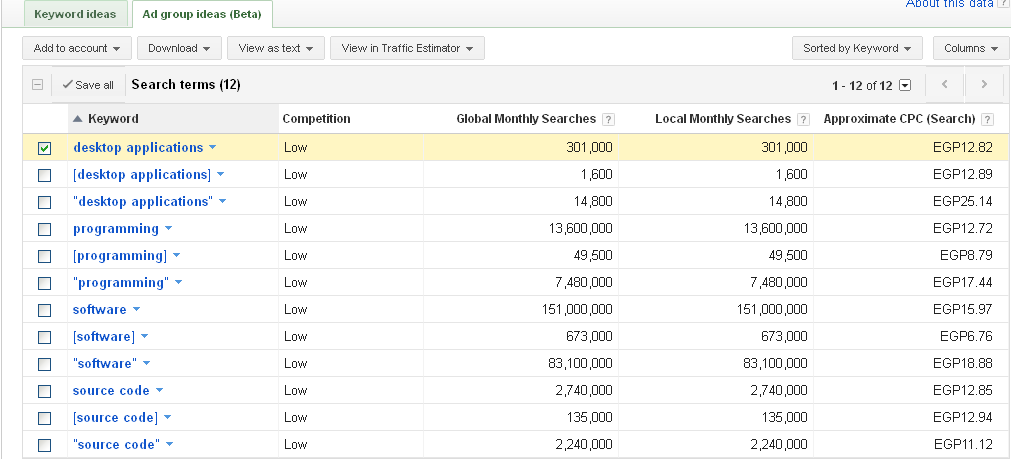
Search results : You can see now that the search resulted some keywords idea.
How to extend your Keywords search to get the most paying ones
Keyword "desktop application" 
CPC / Cost Per Click "12.82 EGP or 2.00$"

Keyword "desktop application" 
CPC / Cost Per Click "25.14 EGP or 4.00$"

- Now, as a programming content writer "Publisher" I know that including these keywords in my website will pay me CPC accordingly, also I need to optimize my website to be in the first search result when someone Google some of these Keywords ideas and place ADS in my website pages to be more visitor-friendly click-able and of course maximize my traffic.

How to extend your Keywords search to get the most paying ones

How to extend your Keywords search to get the most paying ones

- More like this , When Keywords Search Results appear, you will notice a link at the right-bottom of the search result called "More Like This", and it means that the Keywords search engine will display more keyword ideas about the above search query you provided it. When using 'More like this' link, you will get more Keyword ideas with various CPC, Competition,Global Monthly Searches and Approximate CPC (Search). I strongly suggest using it to get the best ideas about any keywords you are looking for.
How to include these keywords within your website HTML structure

When writing a website content, originality is not the only stone key for earning high amount of money, but yes it will earn you some, but if you want to earn some real money, then you need to write these above strong Keywords properly.

<title>Desktop applications – Providing desktop applications programming</title>
<meta name="keywords" content="desktop application, Microsoft Windows desktop applications, creating desktop applications for dummies">
<meta name="description" content="The best Desktop applications store for Microsoft Windows OS">
Notice that these Tags and their contents are relevant to the keywords we write about. HTML is not so hard to learn, but you really don't need to be HTML expert to write keywords for your own website, it's so simple. You can include the above TAGS in your website pages just before the </Head> head TAG closed.


Things we will discuss later :
- Things you need to know before applying to Google AdSense
- Reasons why your Google AdSense earns low.
- How advertisers choose you to place ADS on your blog?
- How to get ready for AdSense? (AdSense, before your start, must read.)
- There are many advertisers with the same product, how does it work with me?
- Closer look at Google AdSense homepage, what are those tools mean (CPC, CTR ...)
- How to write a successful blog?
- How to attract advertisers who pay high?
- How to successfully place an AD on your blog?
- How to build your audience community?
- How to choose your Keywords for your blog?
- How to stop irrelevant ADS from showing in your pages?

Sunday, April 7, 2013

Hosted AdSense for content (Youtube) stopped counting earnings

Hosted AdSense for content (youtube) stopped counting earnings
Hosted AdSense for content stopped counting earnings
The answer is so simple : Check your YouTube Analytic section to display your estimated earnings.
Hosted AdSense for content stopped counting earnings
  • Why the estimated earnings for Hosted AdSense for YouTube.com stopped counting anyway ?
The answer as stated by AdSense : To ensure the best and most accurate calculations for the earnings made from YouTube ADS on videos.

"So, in an effort to ensure we deliver our partners the most accurate and consistent financial performance data for their videos, we are making some changes in how YouTube interacts with AdSense. Starting April 1, 2013, AdSense will no longer calculate and report AdSense for Content Host earnings for YouTube partners. Instead, AdSense earnings from YouTube videos will only be calculated by YouTube and displayed in YouTube Analytic."
- The problem is that YouTube calculates estimated earnings for any clicks after two days, and the clicks counting is still displayed in the AdSense Home Section.
Hosted AdSense for YouTube stopped counting earnings
Hosted AdSense for YouTube stopped counting earnings, but still displayed in the AdSense Home Report
  • What is the effect on you as a YouTube Partner ?
Absolutely nothing.

"Have you ever wondered what the difference between AdSense earnings and YouTube earnings was? As a bit of background, many YouTube partners have ad earnings from two sources: auction-sold ads (AdSense earnings) and reserve-sold ads (YouTube earnings). YouTube serves the optimal ads when a viewer watches the video. Previously, AdSense calculated and reported the auction-sold AdSense earnings. YouTube calculated reserve-sold and miscellaneous earnings and reported both AdSense and YouTube earnings. Now, having only the YouTube system calculate all your earnings will simplify and streamline your video reporting."

Things we will discuss later :
- Things you need to know before applying to Google AdSense
- Reasons why your Google AdSense earns low.
- How advertisers choose you to place ADS on your blog?
- How to get ready for AdSense? (AdSense, before your start, must read.)
- There are many advertisers with the same product, how does it work with me?
- Closer look at Google AdSense homepage, what are those tools mean (CPC, CTR ...)
- How to write a successful blog?
- How to attract advertisers who pay high?
- How to successfully place an AD on your blog?
- How to build your audience community?
- How to choose your Keywords for your blog?
- How to stop irrelevant ADS from showing in your pages?

Thursday, March 14, 2013

AdSense 2013 is interacting with publishers

AdSense 2013 is interacting with publishers

Hello,
I know that the most of you reading this won't believe me when I say that Google AdSense is offering interactivity and help for the publishers and the AdSense users. Yes, it's true.

I have received an a post through Google+ today to participate in Google AdSense Optimization Tips program through E-mails, I don't know if this is a first or not, but as far as I know, I've been using Google AdSense for more than 5 years now and I've never noticed such enthusiasm from Google AdSense.

Anyway, in case you did not get this right away from Google+ or from email, let me take you through a quick tour through the optimization program by AdSense.

1) How to participate .
- Follow these steps to participate.
It says it will take more than 10 days to see effect.
      1. Open your AdSense account
      2. Navigate to Account Settings then
      3. Personal Settings, click Edit
      4. Check all of / any of the boxes :
Email preference

2) What is AdSense offering.
- AdSense is offering help for current and new publishers to maximize their earnings with Google Revenue program called AdSense by using knowledge resources provided from high earners and successful publishers that use Google AdSense and actually earn a lot of money, these resource are :
  • Best practice of Ad placement related to (Forums - Blogs - Games Sites - Classified Site)
  • Most successful Ad styles and Ad sizes
  • Using the link Ad units
  • Lifting up your CPC
  • A/B testing.
I've already subscribed for AdSense Optimization Tips program, you too should subscribe to the maximize your earnings with AdSense.

  • Helpful posts to increase your CPC :
How to meet the Eligibility to participate in AdSense
How to meet the Eligibility to participate in AdSense ? This is the question. And in order to be able to embed "Use&q..

Ever since you started Google AdSense , h ow many times have you visited a page in a website and you noticed that Google AdSense is showing...


Things we will discuss later :
- Things you need to know before applying to Google AdSense
- Reasons why your Google AdSense earns low.
- How advertisers choose you to place ADS on your blog?
- How to get ready for AdSense? (AdSense, before your start, must read.)
- There are many advertisers with the same product, how does it work with me?
- Closer look at Google AdSense homepage, what are those tools mean (CPC, CTR ...)
- How to write a successful blog?
- How to attract advertisers who pay high?
- How to successfully place an AD on your blog?
- How to build your audience community?
- How to choose your Keywords for your blog?
- How to stop irrelevant ADS from showing in your pages?

Sunday, March 10, 2013

AdSense Homepage understanding

AdSense Homepage understanding

Inside AdSense homepage

When you log into your AdSense account Homepage to take a look at your growing earnings you always land at the page where a part of it looks like the photo above. Google AdSense displays to you some facts about your statistics on how you are doing  !

Statistics like : Page views, Clicks, Page CTR, Page RPM, CPC, Estimated earnings. What are those? Where do they come from? How do I know if I'm doing fine or if I can do better using these statistics guide?
  • Page views
    What is AdSense page view ?
AdSense report - Page viewsIf you have a page or a website (I.e : https://example.com) and this domain contains many sub-domains (I.e. : https://main.example.com , https://example.com/myweb/) and this domain is registered and approved by AdSense revenue program for contents, but you are not displaying any Ads on the domain or the sub-domain, then Google won't count any page views in your Page views report. 
If you are displaying Ads on any of the domain or the sub-domains then every time a user will reach to your page, Google will count this visit as one visit regardless how many is your page displaying.

By setting your main time (I.e : +2Cairo GMT) , then the Page views will start counting at 10:00 Am everyday, so if 100 people reached your pages where you display your Ads from 10:00 Am on Saturday to 10:00 Am on Sunday, then your Page views report of Saturday will be 100 visits.
  • Clicks
    What is AdSense Clicks ?
While you are showing AdSense Ads on your web contents, you get visitors and those visitors are called (audiences), when many audiences reach your page at the same time then this is called (traffic). Traffic is one of the most required factors to get rich faster using AdSense, because when you get a high traffic then the chances of getting more clicks are fair enough to make your day even with one single post.

A click is counted when a visitor land on your page that is displaying AdSense Ads and click on an Ad in the page, then it counts as one click, but if the Ad type is a link Ad, then it will be counted as a click when a user clicks on the Ad inside the Ad links that he clicked before. Clicks are the keys to earn money, one click on an Ad displayed on your page can earn you more than 30$, and another click would earn you 0.05$.
  • Page CTR
    What is AdSense page CTR ?
     
Page CTR or Page Click-Through Rat, is a performance measuring tool that enables you to determine whether your niche [AdSense Ad Placement] is getting  clicks or not. If you placed your Ad in the right-top corner of a page (Page A) and the same Ad in the left-bottom corner of another page (Page B) and you have 200 visitors for each page (A and B) while Page A got 5 Clicks but Page B got 1 click, then your CTR would be :
For Page A CTR = (5 / 200) % is 2.5%
For Page B CTR = (1 / 200) % is 0.5%

That means that niche on page B is a waste of time, and you need to change your niche on page B to be like niche on page A because niche on Page A is more clicked by the same amount of visitors .... Why ?

There is no way we can measure the effect of your Ad placement (Niche) on the visitors' eyes because this is emotional stuff, but we have some rules here :

400 people visited your 2 pages looking for the same thing.
200 of them liked what their eyes saw and clicked on it (Page A) with a percent of 2.5%
the other 200 liked what they saw but they were not attracted to click when your (Niche) was placed like that in the page B.
  • Page RPM
    What is AdSense page RPM ?
     
Page RPM or Page Revenue Per 1000 Impressions, is also a measuring tool but this tool is different, how?
Page RPM lets you know how much you will earn at these current conditions when you get 1000 Ad impressions, again what do you mean? .... OK!

Let say your estimated earnings per day is 8$ and your page views are 500 then your Page RPM is :
(6 / 1000) * 1000 = 6.00$, so per month (average 1000 views/day *31 = 31000 views/month) = 6.00$ * 31 = 186.00$ per month.... How to use this figure ?

Now, it means that if your target is to make 1000.00$ per month with Google AdSense then page RPM will guide you through, so :
When (1000.00$) is the goal when the average current condition is RPM 6$, then you need 5,500 page views a day to achieve your goal, so (5,500 / 1000) = 5.5 * 6$ = 33$ per day equals (33 * 31) = 1032$ per month.

Finally, this tool is page RPM is designed and found to work on your cash goal in the future, and notice the change in your RPM to determine how much you want to earn in the future if you are willing to change your policies of publishing.
  • CPC
    What is AdSense CPC ?
CPC aka (also known as) Cost-Per-Click, is the amount of money that advertisers are willing to pay you for a single successful click on their Ad placed on your website, some advertisers pay high and some others pay low. You can monitor the CPC of your Ads from the performance report at the section of (Ad units), you will see how much the click costs for a single Ad unit.

There are several methods that a publisher can use to increase the CPC for his Ads, like :
Choosing the right Niche of the blog, Interactive blog with comments, High page rank will maximize your CPC, Make your blog available on various platforms, targeting high paying clickers from countries like USA, relevant ads on your page. The content of your website needs to be textual and informative in order to get more traffic and improve the chances of getting clicks.

Using the AdWords keyword tool will help you getting the average CPC of your Ad clicks, some sites earn high because their Ads are placed on a high paying keywords website, some others don't. There is no way to make sure that readers or visitors will click on the Ads.

  • Estimated Earnings
    What is AdSense Estimated Earnings ?
     
Estimated earnings are calculated daily, each time a click takes place, an estimated earning is calculated for this single click based on your CPC factor, finalized earnings are calculated at the end of each month and the change of earnings from (estimated and finalized) is slightly low, also if you are using a local currency that need to be exchanged, then the difference between that estimated and finalized earnings is based on another factor called (Ex-change Rate).

Estimated earnings are displayed in your homepage report and the performance report as well, it varies from publisher to another based on several factors like the site traffic and CPC. High traffic means, good opportunity for Ads click, high CPC means high estimated earnings.


Things we will discuss later :
- Things you need to know before applying to Google AdSense
- Reasons why your Google AdSense earns low.
- How advertisers choose you to place ADS on your blog?
- How to get ready for AdSense? (AdSense, before your start, must read.)
- There are many advertisers with the same product, how does it work with me?
- Closer look at Google AdSense homepage, what are those tools mean (CPC, CTR ...)
- How to write a successful blog?
- How to attract advertisers who pay high?
- How to successfully place an AD on your blog?
- How to build your audience community?
- How to choose your Keywords for your blog?
- How to stop irrelevant ADS from showing in your pages?

Friday, March 8, 2013

What AdSense is all about

What AdSense is all about

Do you really want to apply to Google AdSense ?
Are you really ready to be accepted ?

Let me first tell you that if Google rejected your request or you got banned then there is no known way until now to go back in the business with AdSense. Before you apply to Google AdSense revenue program then you should read this first.

If you don't know whether you are ready or not, then I strongly suggest that you read this first and evaluate yourself. Ask yourself a question after reading this article , do I have what it takes to start applying with AdSense?

These are the steps and tips needed to become a valid AdSense user and to start earning money with Google AdSense program :
Jewls.Png AdSens.Png

You should have something that people want to read about.
  •  When you open the AdSense page to start using it, it says [Get more value from your online content], and that only means that Google AdSense program is all about [Contents that are online], what are those contents that AdSense supports :
      1. Contents
      2. Search
      3. Videos
      4. Mobiles
      5. Online Games
      6. Affiliates 
  • What about content, do you have a content that people want to read about ? 
AdSense, before you apply to AdSense, you need to read this first
An online content is a website that you have a full access to its HTML structure where you will be required to authenticate so when verified you will have to display Google AdSense codes within the HTML structure of this web content (Website).
Example : If you are a professional programmer and you came up with some application that many other programmers are looking for or even an application that is so much needed in the market, then you can get a website and talk all about it.

Then of course people [Beginner, intermediate and professional programmers of the same language will visit your website also clients who actually need such application will need to read about it] those readers are called [Your audience].

Then you apply for Google AdSense program to earn money from showing Ads on your website that people visit [Programmers and Software clients].
  •  What about search, do you have a content that people want to read about ?
AdSense, before you apply to AdSense, you need to read this first
Your online content (website)'s visitors may want to search for something while they are in your website, Google provides the online contents owners with Google search engine for free, where you can display Ads in the search result pages, and you earn money when people click these Ads in the search result pages.

If there are many people (audiences) who visit your website (Online content) to read about something, then they will of course use the search engine in your page to either look for something different, something better or even something cheaper.

Only those who own websites that they have access to its HTML structure can participate in this type of Google product revenue program as such as the previous (Content) product.
  • What about videos, do you have a content that people want to read about ?
AdSense, before you apply to AdSense, you need to read this first
Owning videos either because you captured them or because you have the right to own and publish under your name as a owner, is just not enough to apply for such AdSense product revenue program, besides the previous conditions, you need to own a YouTube.com channel and more than approximately 50000 viewers or higher view these videos, only then, YouTube.com will send you an e-mail to let you know that you've become a YouTube.com partner, therefore Google will allow you to apply to AdSense.

Linking your YouTube Channel with Google AdSense program will allow you to display in-stream video Ads, of course you can not do that manually, but Google will enable this option for you every time you upload a video or edit your previously submitted videos from video manager in your channel options.

You will earn from displaying these Ads in your channels or videos and when people click them, of course in order to get clicks from audiences, the Ads should be relevant to the video (Video title, description, keywords).
  • What about mobiles, do you have a content that people want to read about ?
AdSense, before you apply to AdSense, you need to read this first
Two types of people use this revenue program of this (Mobiles) product (1) Mobile applications or games developers (2) Mobile sites owners, If you are neither then you should forget about it. You will earn money each time people see or click on the Ads displayed on your mobile contents (App or Games, mob. Website).

The same conditions that apply on the content product up there are also the same here, when it comes to App. or games then you should know that relevancy doesn't matter, if you have what it takes to come up with a game or an application for free or prepaid then you will have the ability to apply to Google AdSense Mobiles program to earn money.

You will earn money when your application users or your game players see or click Ads that are displayed while they are using these products of yours.
  • What about Online Games, do you have a content that people want to read about ?
There is a big difference between desktop games and online games. Online games are those games hosted online within a website and can be accessed by its developer to display Ads on it, while desktop games could require online registration or online connection is not an option.

Online game developers can apply and earn money with Google AdSense revenue program of the product Online Games when they finish the game and people play it and enjoy it of course then they can earn money.

Online game developers will earn money after Google accepts their request to join the revenue program, when people see or click on Ads displayed by their choice (maybe after some level passing or at the end of the game maybe).
  • What about affiliates, do you have a content that people want to read about ?
Verizon.com, Offers.com if you are familiar with these two names then you already know that the revenues will be much, those were an example of the advertisers that advertise using the affiliate program in Google AdSense.

You can participate in this revenue program of the affiliate product after Google accepts your request to join, only apply if you have what it takes.

It is easy to apply and be accepted, it's 100% similar to the content product. You will earn money after you are accepted when you sell stuff using your website. When you place a I.e Verizon.com in your website, and someone decided to buy this product from Verizon.com, then you will get a commission for this.
Before you apply to AdSense revenue program you should read this first
If you don't have any of these qualifications, then don't apply, it is hard that you are not into something from the above, but being into something from the above is not enough to earn money.

Again, if you got banned from Google AdSense revenue program, then there is no known way to come back.


Things we will discuss later :
- Things you need to know before applying to Google AdSense
- Reasons why your Google AdSense earns low.
- How advertisers choose you to place ADS on your blog?
- How to get ready for AdSense? (AdSense, before your start, must read.)
- There are many advertisers with the same product, how does it work with me?
- Closer look at Google AdSense homepage, what are those tools mean (CPC, CTR ...)
- How to write a successful blog?
- How to attract advertisers who pay high?
- How to successfully place an AD on your blog?
- How to build your audience community?
- How to choose your Keywords for your blog?
- How to stop irrelevant ADS from showing in your pages?

Tuesday, February 19, 2013

Stop Irrelevant ads from appearing on the site's/blog's page

Stop Irrelevant ads from appearing on the site's/blog's page

Ever since you started Google AdSense, how many times have you visited a page in a website and you noticed that Google AdSense is showing nothing about what you are reading in the site's page or even close to the site's content.

Do you have a Website/Blog with a few or maybe little clicks per day though you have a large traffic ?
- Or - 
have you accessed your website anonymously and found that Google AdSense units are irrelevant to what you are writing about, and that is making your large traffic is not interested in clicking your AdSense units ?

The question is : 
How to stop irrelevant Google AdSense Units from appearing on your Site/Blogs' pages ?
- Or -
How to place relevant Ads on your Website/Blog's page so that your visitors will want to click them ?
Read carefully
 If you think you tried everything, then you are wrong. The following tips are recommended by Google itself and by publishers who got rich and wrote their stories about these tips of how did he/she got rich using Google AdSense while having relevant Ad units was the key to success, because as I said earlier :
"Relevant Ads = Good website impression = Thousands of clicks"
Remember that there are some reasons why Google Ads don't appear related to content on your Site/Blog which you have nothing to do with it and out of your reach, for example :
  • Google AdSense did not visit your site yet, it is also called Crawling .
Tip #1
Set your AdSense Ad unit to display both "Text and Image/Rich Media Ads" ....
Get rid of irrelevant Ads when they are assigned to the wrong type of Ad
  • Sometimes you stick with the type of Ads "Image/Rich Media ads only" while this type is no longer or ran out of Ads that is relevant to your site's content, while the Ads type of "Text & Image/rich media ads" still having or are having a lot of relevant Ads with your site's content.
  • All you need to do is simply go to your Google AdSense account, My Ads and edit some ads type or create new ads with the right type.
Tip #2
Write a content with rich information about your blog/site's title .....
Write content, even if your site is about media products
  • Publishers with programming skills who create media products or publishers with license to promote media products, these products could be "Macromedia Flash, Mp3, Audio, Video or Java Applets" are required to write rich articles about their products of these sorts.
  • In order to enable Google AdSense crawlers to identify their contents correctly and target relevant Ads to place them on the page, as AdSense crawlers are incapable of identifying these media products without writing about them.
Tip #3
Don't write Adult or non-family unsafe or offensive contents ....
  • Porno, hate speech, non-family and offensive materials or contents are sensitive materials, considering writing about them is a risky job to do, specially when you have AdSense assigned with your blog/site where you write contents about these stuff. It various from publisher to another how explicit the sensitivity is, there is a thin line between pornographic and scientific, nudity and porno , your opinion about something going on and hate-speech.

  • Who do you think want to advertise his products with these risky materials specially if you don't know how to write about them. Writing about these materials will 100% cause an irrelevant Ads to show on your page.
Tip #4
Write contents in languages that only supported by Google AdSense ...
Write in your own language only if it is supported by AdSense
  • If AdSense goal is to advertise, then it's a common sense to address the public or potential customers with their own language, and since the whole universe is not using Google AdSense service of advertisement (AdWords, AdSense for you as a publisher), then naturally not all the publishers in the universe will get to help Google to advertise, but this is not the whole point.
  • Targeting is not about languages, it's about markets. The supported languages by Google AdSense system will only show on a website/blog written in a language that is supported, BUT from any place on the earth. My advise to you is to learn English very well.
Tip #5
Write your contents that you wish to place AdSense units with in the same Frame ... 
Don't place AdSense units in a separate frames or within IFRAMES

  • In order to be an AdSense user, you don't need to be an HTML expert, but a little knowledge about what is allowed and what is not is a must. If you are using Google AdSense and you got a website design that is not a valid place to show your Ads, you can not blame anyone but yourself as it's clear that you can not separate AdSense units from your contents through putting them within separate frames or within IFRAMES because Google AdSense targeting system is designed not to derive keywords and contents from IFRAMES and separate frames, also it's illegal to place AdSense units within IFRAMES.

    • If your website is using Session -- ID then you won't be able to show Ads related to your contents as Session --- ID websites naturally their links expire soon and so you won't be indexed or marked by Google crawler as visited at all.Also it is known that if you are using a LogIn form in your website then you need to specify a user name and password to Google AdSense crawler in order to enable the crawler from accessing you website content and keywords to determine the best relevant AdSense units to match your website/blog.

Give Google AdSense an access to your website to give you relevant AdSense units
Tip #6
Write contents that matches you Blog/Website's title and use relevant keywords ....
Make it easy for both readers and AdSense to determine what you are talking about.